2 Operators
There are many operators in R. Type ?Syntax and then press the ENTER key on your keyboard will take you to the documentation on “Operator Syntax and Precedence”. In this session, we introduce three groups of commonly used operators in R.
2.1 Arithmetic operators
Just like a calculator, R understands basic arithmetic operators. Try these following commands and see if the printed value is what you are expecting:
Want to know more about these operators? Type ?Arithmetic in your REPL
2.2 Relational operators
Relational operators compares values on its left and right.
Use == only when comparing integers. We will revisit this issue when we introduce how real numbers are represented in the computer memory.
2.3 Logical operators
Truth table for R’s element-wise logical operators:
x |
y |
x & y |
x | y |
xor(x, y) |
|---|---|---|---|---|
TRUE |
TRUE |
TRUE |
TRUE |
FALSE |
TRUE |
FALSE |
FALSE |
TRUE |
TRUE |
FALSE |
TRUE |
FALSE |
TRUE |
TRUE |
FALSE |
FALSE |
FALSE |
FALSE |
FALSE |
[1] TRUE
[1] FALSE
[1] TRUE
[1] TRUE
[1] FALSE
[1] TRUE
[1] FALSE
2.3.1 Difference between & and &&, and between | and ||
The & and | operators are vectorized, meaning they operate element-wise on vectors. The && and || operators, on the other hand, are not vectorized and only evaluate the first element of each vector. This means that if you use && or || with vectors, an error will be given. For example:
2.4 Operator precedence
In a mathematical equation, we know that multiplication and division take precedence over addition and subtraction. This precedence may be altered with the use of ().
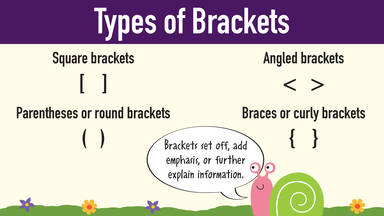
Operators in R are also governed by an order of precedence, which may be altered with the use of (). Type ?Syntax will show you the precedence of all R operators many of which we have not introduced. It is important to note that when mixing multiple operators in the same line of code, some operations takes precedence before others.
Between the three groups of operators we introduced, arithmetic operators takes precedence over relational operators which takes precedence over logical operators.
Try and work out the values of the following expressions without running them in R, and verify your results in R.
9 - 10 > 0 & 9 > 0      # Operator precedence (arithmetic > relational > logical)
9 - (10 > 0 & 9 > 0)    # Alter operator precedence with brackets
9 - (10 > 0) & 9 > 0    # Alter operator precedence with brackets
TRUE | FALSE & FALSE    # & takes precedence before |
(TRUE | FALSE ) & FALSE # Alter operator precedence with brackets
2.5 Summary
Quick reference for the three operator families we have covered:
| Type | Common symbols | Typical purpose |
|---|---|---|
| Arithmetic | + - * / ^ %% %/% |
Perform numeric calculations; highest precedence of the three. |
| Relational | > < >= <= == != |
Compare two values and return TRUE or FALSE. |
| Logical | ! & && | || xor() |
Combine logical (TRUE, FALSE) results; use &/| for element-wise checks in vectors and &&/|| for single values; lowest precedence of the three. |
Type ?Syntax for more detailed documentation on operators in R.
These operators are also referred to as binary operators for they take two objects (x and y) as inputs to produce one output object. x and y are also referred to as operands of the operation. + and - are unary operators when used to indicate the sign of numeric values.